Files beside the session
Keep the workspace, conversation, and context together instead of stitching windows.
Cocode GUI puts sessions, files, terminals, runtime state, and diff previews on one workbench so you can see what the agent did before you confirm it.
Capabilities and limits follow the current release
Cocode GUI is a desktop AI coding workspace that keeps Sessions, files, terminals, runtime state, and diffs in one interface. It is for developers who want to inspect real impact before an agent writes files, runs commands, or continues a task.
Keep the workspace, conversation, and context together instead of stitching windows.
Open code changes, attachments, and results in a preview surface.
Run commands without leaving the task context.
The GUI puts task conversation, file tree, terminal, and runtime state together so the agent’s explanation and the repository’s actual changes can be compared.
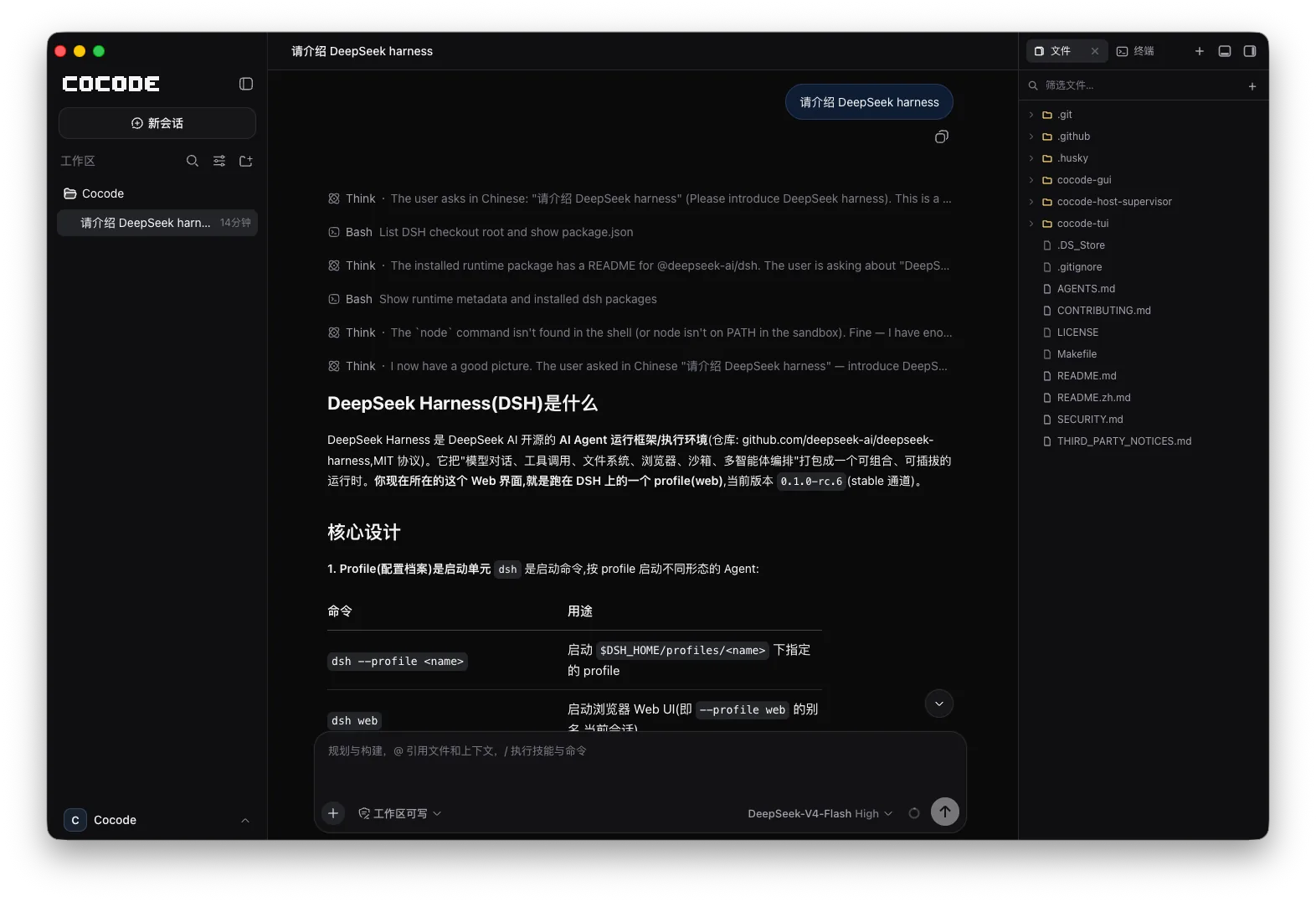
If you want to see the impact before files are written, commands run, or network tools are used, the GUI provides the strongest visual context.
Clear boundaries make real development work easier to trust.
GUI and TUI are not separate products. With the same Host scope, both clients can continue the same session.
Clear boundaries make real development work easier to trust.
This is an executable, reviewable path through a real repository—not an abstract feature list.
Start from the workspace so the file tree, conversation, and runtime state share one context.
Set goals, acceptance criteria, and protected areas, then inspect the agent plan and tool actions.
Check actual changes, attachments, command output, and tests before continuing.
Use the integrated terminal or continue the same Host and Session through TUI or SSH.
See files, conversation, terminal, and results together with fewer window switches.
Understand the impact before writes or further execution in higher-risk codebases.
Organize the task in GUI, then finish remote verification through TUI or SSH.
After creating the task on desktop, open TUI in the same environment to continue.
cocode doctor
cocodeGUI makes context and impact easier to inspect. Actual behavior still depends on the workspace, Host, model, and permissions.
| Capability | Status | Conditions and evidence scope |
|---|---|---|
| Files and diffs | Visible | Inspect workspace files and agent changes within the current task scope. |
| Terminal workflow | Integrated | View and run commands without leaving the task context. |
| Cross-client continuity | Same-scope support | GUI and TUI must connect to the same Host, Profile, and Session. |
| Automatic safety | Not implied | A visible interface cannot replace permissions, confirmation, backups, and real tests. |
Cocode GUI puts model explanations, file diffs, terminal output, and runtime state where they can be compared. Whether to continue depends on actual impact and task risk.
The website provides download entry points for macOS, Linux, and Windows. The exact installers depend on the matching GitHub Release.
Yes. Files, diffs, attachments, and terminal state are presented in the visible workspace.
Interface shape alone cannot decide safety. GUI provides more visible context, while both clients still require correct permissions, confirmation, and verification.
They can connect to the same task within the same Host and Session scope. Check active state before acting to avoid concurrent-edit conflicts.